
Download
| File Name | Version | Released Date |
|---|
 |
ExcelDiff_v527.zip |
V5.2.7 |
Aug.30, 2018 |
 |
ExcelDiffTool_v106.zip |
V1.0.6 |
Feb.28, 2018 |
| File Name(Old Version) | Version | Released Date |
|---|
|
ExcelDiff_v437.zip |
V4.3.7 |
Aug.24, 2016 |
Licenses are different for ExcelDiff V4xx and V5xx.(
LINK)
History
|
|
ExcelDiff |
2018/08/30 |
V5.2.7 was released. |
Fixed Bugs
- Fixed a bug that can't set color at [Option Dialog]-[Color].
|
|
ExcelDiff |
2018/02/28 |
V5.2.5 was released. |
|
|
ExcelDiff Tool |
2018/02/28 |
V1.0.6 was released. |
Fixed Bugs
- Fixed a bug that wrongly judged the Excel
version.
|
|
ExcelDiff |
2018/01/31 |
V5.2.4 was released. |
Fixed Bugs
- Fixed a problem that license registration
can not be done correctly.
|
|
ExcelDiff |
2018/01/21 |
V5.2.3 was released. |
Fixed Bugs
- Fixed a problem which can not be compared correctly when comparing merged cells.
|
|
ExcelDiff Tool |
2018/01/13 |
V1.0.4 was released. |
Fixed Bugs
- Fixed a bug that "Copy down" may not be
executed.
|
|
ExcelDiff |
2018/01/06 |
V5.2.2 was released. |
Enhancements
- When comparing "comment", content of comment is output to comparison result.
Fixed Bugs
- Fixed a problem which can not be compared correctly when comparing merged cells.
- Fixed a problem that error of "Requested Clipboard operation did not succeed." was occurred.
- Fixed a problem that caused a system error
when shutting down Windows with ExcelDiff
running.
|
|
ExcelDiff Tool |
2018/01/06 |
V1.0.4 was released. |
Fixed Bugs
- Fixed a problem that a system error occurred
when an error occurred in "reflect" processing.
|
|
ExcelDiff |
2017/12/10 |
V5.2.1 was released. |
Fixed Bugs
- Fixed a problem that cell division position shifted when comparing three files.
|
|
ExcelDiff Tool |
2017/12/10 |
V1.0.3 was released. |
Fixed Bugs
- Fixed a bug that copy did not work
properly.
|
|
ExcelDiff Tool |
2017/12/8 |
V1.0.2 was released. |
Fixed Bugs
- ExcelDiffTool could not be used even when opening the comparison result file of ExcelDiff.
|
|
ExcelDiff Tool |
2017/12/6 |
V1.0.1 was released. |
Enhancements
- The latest version check function was added.
Fixed Bugs
- Fixed not loading comparison result of old version of ExcelDiff.
|
|
ExcelDiff Tool |
2017/12/3 |
V1.0.0 was released. |
Enhancements
|
|
ExcelDiff |
2017/12/3 |
V5.2.0 was released. |
Enhancements
SVN, GIT to cooperate with.
-
ExcelDiff Tool to cooperate with.
-
Improve comparison speed.
Option "Handling of blank title cells"
was added.
Fixed Bugs
- Fixed a bug that the comparison of three files did
not work properly.
|
|
ExcelDiff |
2017/07/5 |
V5.1.9 was released. |
Fixed Bugs
Fixed a bug that property comparison was not done correctly.
Fixed a bug that may not work correctly in some Excel 2016 environments.
|
|
ExcelDiff |
2017/06/23 |
V5.1.8 was released. |
Fixed Bugs
Fixed a bug that property comparison was not done correctly.
Fixed a bug that the comparison when the sheet was increased or decreased was not performed correctly.
|
|
ExcelDiff |
2017/06/06 |
V5.1.7 was released. |
Fixed Bugs
Fixed a problem where errors occurred when files were re-compared.
|
|
ExcelDiff |
2017/06/05 |
V5.1.6 was released. |
Enhancements
Performance comparison of Excel property comparison was improved.
Fixed Bugs
Fixed a problem where errors occurred during comparison.
|
|
ExcelDiff |
2017/05/23 |
V5.1.5 was released. |
Enhancements
Performance was improved.
Enhanced error log information.
|
|
ExcelDiff |
2017/05/04 |
V5.1.4 was released. |
Fixed Bugs
Fixed a bug that errors occurred when
comparing.
|
|
ExcelDiff |
2017/04/27 |
V5.1.3 was released. |
Fixed Bugs
Fixed a bug that errors occurred when
comparing.
|
|
ExcelDiff |
2017/04/23 |
V5.1.2 was released. |
Enhancements
Performance was improved.
The comparison result has been optimized.
|
|
ExcelDiff |
2017/04/21 |
V5.1.1 was released. |
Enhancements
Performance was improved.
The comparison result has been optimized.
Fixed Bugs
Fixed a bug that errors occurred when comparing three files.
|
|
ExcelDiff |
2017/04/20 |
V5.1.0 was released. |
Enhancements
Improved processing speed of comparison of large files.
|
|
ExcelDiff |
2017/04/18 |
V5.0.9 was released. |
Fixed Bugs
Fixed a problem that option setting may not be reflected correctly.
|
|
ExcelDiff |
2017/04/16 |
V5.0.8 was released. |
Enhancements
The license delete button was added.
|
|
ExcelDiff |
2017/04/05 |
V5.0.7 was released. |
Fixed Bugs
Fixed a bug that could not open project file created with V4.
|
|
ExcelDiff |
2017/04/04 |
V5.0.6 was released. |
Fixed Bugs
Fixed a bug that sometimes did not work
properly when "/F" option was specified from the
command line.
|
|
ExcelDiff |
2017/3/29 |
V5.0.5 was released. |
Enhancements
Fix to prevent pages from switching at
comparison.
|
|
ExcelDiff |
2017/3/27 |
V5.0.4 was released. |
Enhancements
"ExcelDiff" menu was added to right click of Widnows Explorer.
License information was added to [Help] - [Version information].
|
|
ExcelDiff |
2017/3/24 |
V5.0.3 was released. |
Enhancements
Corresponds to Excel 2016.
Corresponds to Windows10.
Corresponds to 3 Way comparison.
Performance improvement.
Supported site license / enterprise license.
|
|
ExcelDiff |
2016/8/24 |
V4.3.7 was released. |
Fixed Bugs
- Fixed a bug that does not work in the case , including the " msg " sheet to compare files .
|
|
ExcelDiff |
2016/8/18 |
V4.3.6 was released. |
Fixed Bugs
-
Excel2013 Fixed a bug that does not work
properly.
- Ignore area has been fixed a bug that does
not work properly.
|
|
ExcelDiff |
2016/8/17 |
V4.3.5 was released. |
Enhancements
-
Ignore area was able to be selected. (LINK)
-
Added automatic set macro function when
creating a comparison project. (LINK)
|
|
ExcelDiff |
2016/6/30 |
V4.3.4 was released. |
Fixed Bugs
Fixed the bug that was not able to get the
comparison range correctly when the last row is
hidden.
|
|
ExcelDiff |
2016/6/3 |
V4.3.3 was released. |
Fixed Bugs
Fixed the bug that can not be startup by windows security patch.
|
|
ExcelDiff |
2014/5/16 |
V4.3.2 was released. |
Fixed Bugs
Fixed the bug that can not be startup.
|
|
ExcelDiff |
2014/2/1 |
V4.3.1 was released. |
Enhancements
Added command buttons on "Comparison Option" .
Added the online help button on ExcelDiff result book.
|
|
ExcelDiff |
2014/1/25 |
V4.3.0 was released. |
Enhancements
Fixed bugs
Fixed the bug that can not be compared files of more than 256 columns.
Fixed the bug that can not be compared cs files.
|
|
ExcelDiff |
2014/1/15 |
V4.2.6 was released. |
Fixed bugs
Fixed a bug that was ExcelDiffTool does not work correctly.
|
|
ExcelDiff |
2014/1/6 |
V4.2.5 was released. |
Fixed bugs
Fixed a bug that was comparison result is not output correctly.
Fixed a bug that was ExcelDiffTool does not work correctly.
|
|
ExcelDiff |
2013/12/17 |
V4.2.4 was released |
Fixed bugs
This has been fixed that does not work correctly when you run from the command prompt.
|
|
ExcelDiff |
2013/12/13 |
V4.2.3 was released. |
Enhancements
ExcelDiff Start-up speed has been improved.
|
|
ExcelDiff |
2013/12/11 |
V4.2.2 was released |
Enhancements
Support for silent install.
By executing the following command, silent installation is possible.
msiexec /i ExcelDiff.msi /qb TARGETDIR="C:\temp" PID="xxxxxxxxx" LKEY="xxxx-xxxx-xxxx-xxxx"
Fixed bugs
This has been fixed that does not work correctly when you run from the command prompt.
|
|
Excel Diff |
Nov.22, 2013 |
V4.2.1 was released. |
Modification
Add compare buttons in project screen.
|
|
ExcelDiff |
Apr.03, 2013 |
V4.2.0 was released. |
Modification
Starts supporting Windows 8
Starts supporting Microsoft Excel 2013
The trial term was changed in 30 days.
|
|
ExcelDiff |
Oct.01, 2012 |
V4.1.1 was released. |
Modification
After this version, Windows2000 is the outside for support.
Enhancements
Add option of "Filename"
Add option of "Result file is opened after the end of compare."
Add option of "Format cells of result file"
|
|
ExcelDiff |
Feb.12, 2012 |
V4.1.0 was released. |
Enhancements
Speed up compare.
Speed up compare. Therefore, the following options deleted.
- Specify range to find rows.
- Specify range to find columns.
Fixed bugs
Trouble that the system error occurred during compare process was corrected.
|
|
ExcelDiff |
Aug.01, 2011 |
V4.0.9 was released. |
Enhancements
Added the function of multi specification for "Title Column" and "Title Row"
Before upgrading to V4.0.9, "Title Column" and "Title Row" was unsupported to
the multi specification.
"Title Column" and "Title Row" of new version was made to correspond to
the multi specification.
Please refer to
help for details.
Added option of "Passwords of protected workbook/sheet"
"Passwords of protected workbook/sheet" was added to an compare option.
When protected workbook/sheet was compared, it was necessary to
input the password.
In the use of this function, ExcelDiff automatically unprotect
workbook/sheet by using passwords of this option.
Please refer to
help for details.
|
|
ExcelDiff |
Jun.20, 2011 |
V4.0.8 was released. |
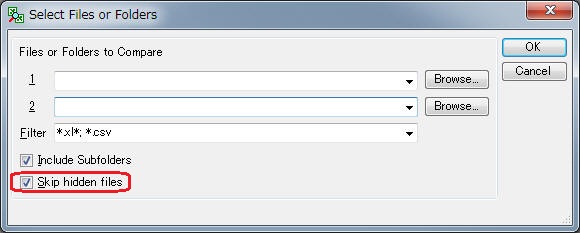
Enhancements
Added the function of "Skip hidden files".
"Skip hidden files" was added. When this option is checked,
hidden files are excluded and compared.
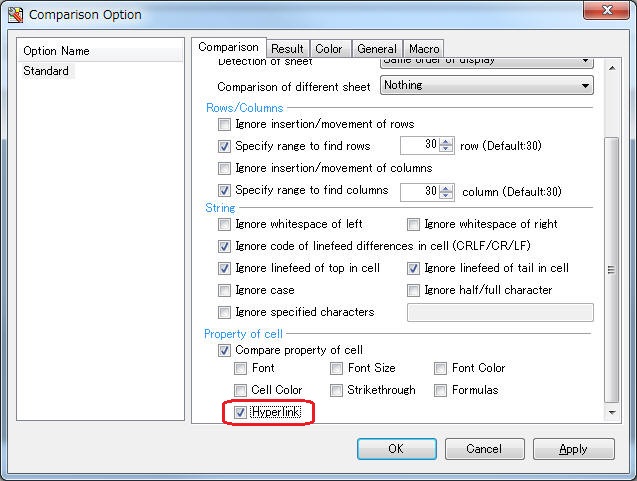
Added function of compare hyperlink
"Hyperlink" was added to [Comparison
Option]-[Comparison]Tab-[Property of cell].
|
|
ExcelDiff |
Jun.04, 2011 |
V4.0.7 was released. |
Enhancements
Added the function of the regular expression for "Ignore specified characters".
Before upgrading to V4.0.7, "Ignore specified characters"
option was unsupported to the regular expression. "Ignore
specified characters" of new version was made to correspond to
the regular expression.
English verion of Help was supported.
Context-Sensitive Help was supported.
New version's help support enables the user to press the F1 key
from an active window, dialog box, or message box, or with a
menu item or toolbar button selected, to invoke a Help topic
relevant to the selected item.
Fixed bugs
Trouble that the system error occurred when compare option
window was opened was corrected.
There was a problem that the system error occurs uncommonly when the
compare option screen was opened. This trouble was corrected.
Trouble that the system error occurred during compare processing was corrected.
There was a problem that the system error occurs uncommonly during compare processing. This trouble was corrected.
|
|
ExcelDiff |
Mar.12, 2011 |
V4.0.6 was released. |
Enhancements
Added CSV fast read.
“High-speed
CSV files reading” was added to Compare Option. Reading with Excel-standard often takes unexpected external time when reading linefeeded cells
in CSV files. This function enables to erase redundant time.
Performance improved for CSV files.
Before upgrading to V4.06, ExcelDiff redundantly configured
“Reflect cell width/height” or “Compare property of cell”.
The new version skips this processing to enjoy more
comfortable performance.
"High-speed sheet name reading" was moved to Compare Option.
“High-speed sheet name reading” under “[Tool]-[Application Option] was moved to [General] under “[Tool]-[Comparison Option]”.
Fixed bugs
Error was eliminated when opening prior versions before Excel 2003.
Current ExcelDiff is able to open Microsoft Excel prior versions
before 2003. Before this upgrade, error massage appeared for those
versions when Compare Option screen was opened, saying “The file
format is not supported under installed Microsoft Excel”.
File is successfully unlocked during Folder Compare Dialog
Previously, file was locked during Folder Compare Dialog. Current
ExcelDiff releases it to allow free access.
|
ExcelDiff |
Mar.08, 2011 |
V4.0.5 was released. |
Enhancements
New contents were added to Compare Options
Following optional methods were added to Column/Row, under “Compare” tab.
-Ignores differentiated linefeed codes in a cell.
-Ignores linefeed at the head place of a cell.
-Ignores linefeed at the end place of a cell.
Help file amendment
New contents were added.
Default was changed for Result File
Default file format for Result Files are changed to “Auto”.
Fixed bugs
Exporting Macro is available for Microsoft Excel 2007 and later version.
This feature was not always working properly to those versions, bug was fixed.
|
ExcelDiff |
Mar.5, 2011 |
V4.0.4 was released. |
Fixed bugs
Fixed blank Language Selection
Language Selection under [Tool] - [Application Option] sometimes got blank, but was fixed.
|
ExcelDiff |
Feb.18, 2011 |
V4.0.3 was released. |
Fixed bugs
Error was avoided when canceling password to protected sheet.
Password is required when analysis involves protected sheet. When canceling the password dialog, system error occurred, but was fixed.
|
ExcelDiff |
Feb.16, 2011 |
V4.0.2 was released. |
Fixed bugs
License will be succeeded properly when upgrading.
This issue was fixed but users who registered the license before version 4.1 would need to re-register via current version 4.1.
To compare multiple regions are selectable based on value.
To compare multiple regions were not selected based on value, occurring system error, but was fixed.
Optimization of compare region works fine.
When entire sheet was selected from addresses to compare, actual data region was automatically extracted for prior version to Microsoft Excel 2007. This feature also became available for 2007 and later version.
|
ExcelDiff |
Feb.15, 2011 |
V4.0.1 was released. |
Enhancements
Enhancement on exceptional handlings
Exceptional handlings included cases of 64 bit OS.
Fixed bugs
System error occurred when extracting compare region from print configuration, but was fixed.
|
ExcelDiff |
2011/01/30 |
V4.0.0 was released. |
Enhancements
Starts supporting Windows 7
SUNTRAP SYSTEMS formally starts supporting Windows 7 for ExcelDiff. Save location for configuration files such as Option File were moved to “C:\Users\UserName\AppData”. In version 3, it was “C:\program files\ExcelDiff”.
Starts supporting Microsoft Excel 2010
SUNTRAP SYSTEMS starts supporting Microsoft Excel 2007.
This feature enables to preserve huge compare result rather than existing product.
File format is able to be selected from either following option from [Comparison Result]-[File Format] on Compare Option screen.
- Excel 97 - 2003 Book (xls)
- Excel Macro-Enabled Book (xlsm)
“Excel 97 - 2003 Book (xls)” format enables to calculate matrix of 65535 columns * 256 rows.
“Excel Macro-Enabled Book (xlsm)” format enables to calculate matrix of 1,048,576 columns * 16,384 rows, when Excel 2007 or later version is installed.
Starts supporting 64-bit Windows
64-bit Windows were covered for supporting.
Menus and Compare Results are viewed in English.
Default language is adjusted to OS language. User is able to change it from Application Option.
English version is available.
ExcelDiff is viewed in English.
Menus and Compare Results are viewed in English.
Default language is adjusted to OS language. User is able to change it from Application Option.

 English
 Japanese
 ExcelDiff
 ExcelDiffTool
 CellViewDiff
 gTaskSync
 gCalendarSync
 CellViewDiff
 gTaskSync
 gCalendarSync